An agent on an inbound call can now transfer the caller to another available agent in a couple of clicks. The caller never has to call back, it stays one call in your history, and the record follows whoever picks it up.
Only transfer to someone who can pick up
The transfer picker only lists agents who can actually take the call: active, online, and on a healthy browser. Anyone unavailable shows greyed out with the reason, a live “ready” count keeps the list honest, and a quick search jumps straight to the person you want, so you never hand a caller off to an empty seat.
It stays one call
A transfer doesn't fracture the call. The caller stays a single interaction with the handoff appended to its history, the recording carries straight through to the same call, and if the new agent doesn't answer, the caller falls back to company voicemail instead of getting dropped. Call history simply shows the last agent who handled it.
Also in this release
IVR-routed inbound calls are now attributed to the agent who actually answered.
The IVR live wallboard card shows an admin badge so it's clear who can manage it.
The email editor no longer double-pastes when you paste plain text.
Recognized caller ID names are normalized to consistent casing.
The IVR builder is now a live visual canvas. Design a flow, watch real calls route through it, catch broken paths before they ship, and keep things tidy as your flows grow.
See calls route through your flow, live
Once a flow is live, you can watch a call move through it in real time. The path a caller takes lights up step by step (the prompt that played, the key they pressed, and the role they finally reached), so the flow you designed and the call that actually happened are the same picture.
app.ironcall.ai/settings/call-routing/ivr
Tidy any flow in one click
Flows that grew branch by branch get messy fast. Re-layout auto-arranges every node into a clean left-to-right structure, untangling crossing connections so you can read the whole flow at a glance, with no more dragging boxes around by hand.
app.ironcall.ai/settings/call-routing/ivr
Catch broken flows before callers do
Ironcall now validates your flow as you build it. Dead-end keys and steps that can't be reached from the start surface as issues you can jump straight to. And because the problems are connected, fixing one often clears the rest. When everything's green, publish with one click.
app.ironcall.ai/settings/call-routing/ivr
Catch infinite loops before they trap callers
Some flows can loop forever: two messages that each auto-advance into the other leave a caller stuck with no way out. Ironcall now detects these loops as you build and flags exactly which steps form the cycle. Re-point one step to a real destination like voicemail and the loop clears, ready to publish.
app.ironcall.ai/settings/call-routing/ivr
See the path every caller took
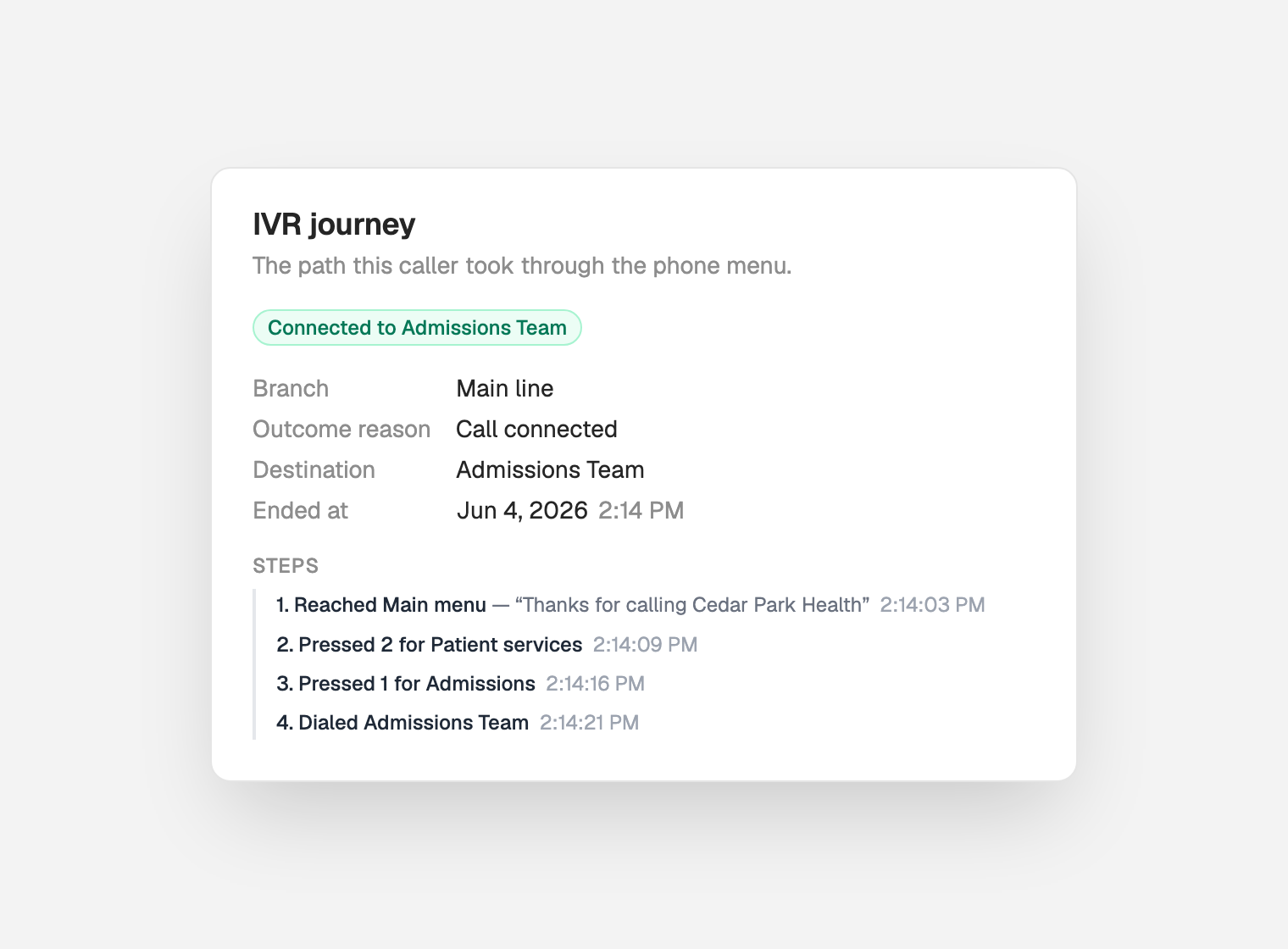
When a call ends in the IVR, its full journey is saved to the call. Open it from call history, voicemail, or the timeline to see exactly what happened: the menu the caller reached, every key they pressed, and where they finally landed, each step timestamped, with the outcome called out at the top.
Watch live calls on the wallboard
The live wallboard shows every in-progress call: who's calling, the branch they're in, the step they're on, and how long they've been there. Callers stuck on a single step for 30 seconds or more flag automatically, so the team can step in before a customer gives up.
Turn an unknown caller into a real contact
When a call comes in from a number you've never seen, the carrier's caller ID name now surfaces right on the contact. In your contacts list, an unknown lead carries its recognized name inline, and one click on “Apply as name” saves it, and the placeholder becomes a real, searchable contact.
…and the same on the contact's profile
Open the contact and the recognized name sits in a dedicated caller ID bar, marked “Recognized.” Press “Use as name” and the profile updates instantly: the Unknown Lead header resolves to the caller's name and the suggestion clears.
Natural voices, on every call
Every spoken prompt now uses Amazon Polly's neural voices, so they sound noticeably more natural and human. And it's not just IVR menus: voicemail greetings, after-hours messages, round-robin handoffs, and outbound connects all speak in the same warm, consistent voice. Anywhere Ironcall talks to a caller, the upgrade comes along for free.
And plenty more under the hood
Beyond the highlights above, this release includes many internal changes and stability improvements we haven't called out individually: the quieter fixes and groundwork that keep the whole app faster and more reliable.
Also in this release
Settings now split SMS and email canned responses into their own sections, so each lives where you expect it.
Clearer UI for telling profile notes apart from timeline notes.
Canned response and snippet settings are clickable to jump straight into a quick edit.
Tables across the app handle small screens more gracefully.
Snippets now ignore invisible characters, so they match and expand reliably.
Clearing an email draft now asks for confirmation first, so you can't wipe it by accident.